Getting to COSSEE
Since June 2026, access to several floors of the Biological Sciences Building has been restricted for security reasons. This includes Level 3, where COSSEE is located.
Please follow the appropriate instructions below depending on whether your ONEcard has been activated for access to the Biological Sciences Building.
If you have an activated ONEcard
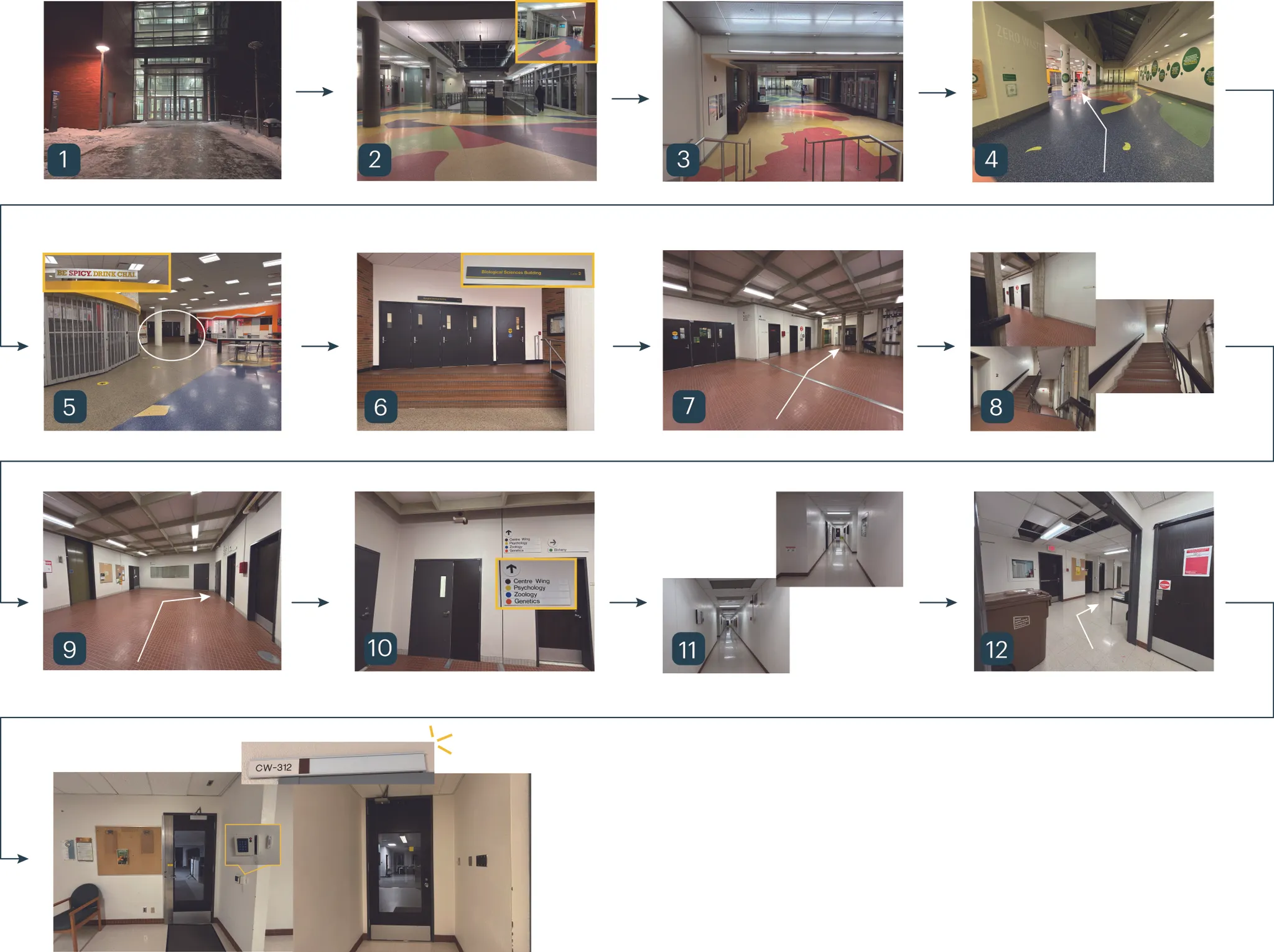
There are several ways to reach COSSEE (CW312) once you are on campus. Here, we introduce one recommended route.
- Go to the CCIS (Centennial Centre for Interdisciplinary Science) Building.
- Enter the building and walk straight ahead.
- Continue straight and go down the short set of stairs.
- After the stairs, keep walking straight.
- You will see a café on your left as you enter an open seating area.
- The entrance to the Biological Sciences Building (BioSci) will be directly ahead.
- Enter the building. You will see elevators on your right and stairs farther ahead.
- Take the stairs up one floor.
- At the top of the stairs, you will see two doors ahead, one on the left and one on the right.
- Use the door on the right and tap your activated ONEcard on the card reader. ONEcard access is required at this door at all times.
- Walk straight to the end of the hallway.
- Turn left - COSSEE, room CW312, will be on your right.
If you do not have an activated ONEcard
Visitors without Biological Sciences Building (BioSci) access on their ONEcard can reach COSSEE using the route shown in the map. Please note that this route is available without a ONEcard only between 7:00 and 18:00 on weekdays.
- Go to the CCIS (Centennial Centre for Interdisciplinary Science) Building.
- Enter the building and walk straight ahead.
- Continue straight and go down the short set of stairs.
- After the stairs, keep walking straight.
- You will see a café on your left. Continue through the opening directly ahead.
- Go up the short set of steps and enter through the doors marked BioSci.
- After entering the BioSci building, turn left and go through the black double doors.
- Continue straight along the corridor, passing the seating areas and display cases.
- At the open area at the end of the corridor, continue toward the stairwell on the right.
- Take the stairs up one floor.
- At the top of the stairs, go through the black double doors to the left ahead. These doors are unlocked without a ONEcard between 7:00 and 18:00 on weekdays.
- After passing through the doors, walk straight - at the halfway point of the hallway, COSSEE, room CW312, will be on your left.
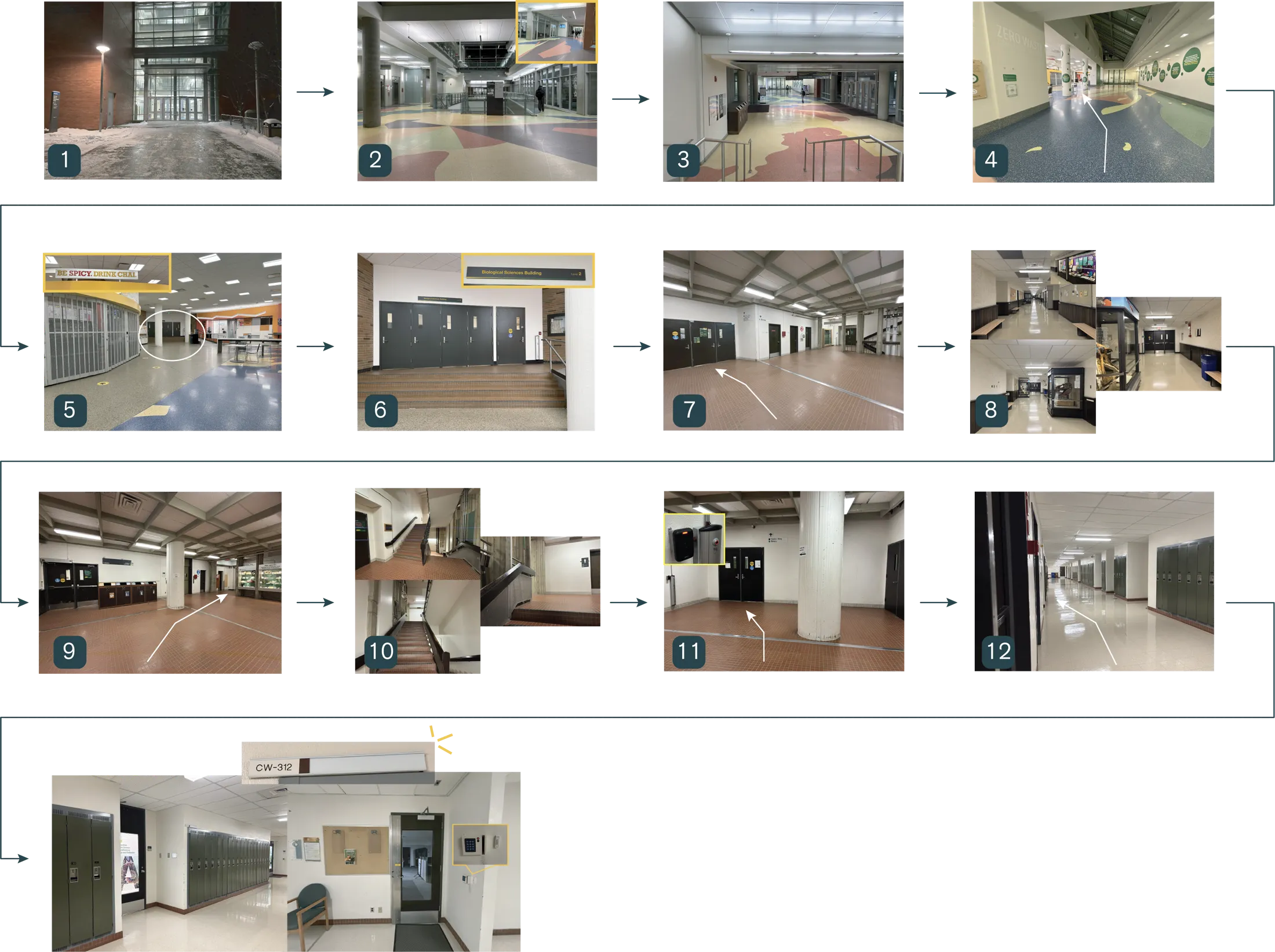
When you arrive at CW312, please use the doorbell to let COSSEE members know that you have arrived.
Outside the weekday access hours, the doors at Point 11 require an authorised ONEcard. Please arrange in advance for a COSSEE member to meet you and let you in.
Entering COSSEE
Please note that the following times refer to entry into CW312 itself, rather than entry to Level 3 of the Biological Sciences Building.
- The kitchen-side door to CW312 is normally unlocked between 9:00 and 17:00.
- COSSEE members with the appropriate access can enter at any time using the card reader.
- If you are a COSSEE member, have forgotten your card, and no one is in CW312 (!), please follow the instructions pinned in the Discord #announcements channel.
Contact COSSEE
Send us your message through the form below. It is the quickest way to reach the team for questions, collaboration ideas, and general enquiries.
If the form does not load here, open it directly: COSSEE contact form.